bunpav vs Meshy AI
bunpav vs Meshy AI: which AI 3D generator fits your pipeline?
Meshy is the broadest self-serve pipeline in the category — generation, texturing, rigging, and 500+ animation presets, publicly available today. bunpav focuses on a tighter prompt-or-photo-to-mesh loop with a wider raw export range, but is still in private beta. Here's an honest, dimension-by-dimension look at both.
quick answers
The short version
Is Meshy or bunpav better for a full generate-to-animate pipeline?
Meshy — it bundles generation, AI texturing, auto-rig, and a library of 500+ preset animation clips in one browser tab, with native Unity, Unreal, Godot, and Roblox integrations. bunpav rigs humanoid and creature skeletons in the same generation pass but doesn't ship a preset animation library.
Which one is actually free to use today?
Meshy, unambiguously — its free tier gives 100 credits a month right now, though output is public and CC BY 4.0 licensed. bunpav's free welcome credits exist, but the platform itself is still gated behind a private-beta waitlist.
Which has the better pricing model for indie budgets?
It depends on your usage pattern. Meshy Pro is a $20/month subscription for 1,000 credits with private ownership. bunpav sells prepaid credit packs with no recurring commitment — Starter at $9 for 100 credits, Studio at $39 for 550, Pro at $89 for 1,500 — useful if you'd rather not keep a subscription running between projects.
Can I use free-tier output from either tool in a commercial game?
Not from Meshy's free tier — that output is public and CC BY 4.0 licensed, which rules out confidential or exclusive commercial use. bunpav is not yet publicly self-serve to compare on this point directly; check current terms before shipping anything from either tool's free tier.
side by side
Full comparison
| Dimension | bunpav | Meshy AI |
|---|---|---|
| Availability | Private beta, waitlist-gated | Publicly self-serve today |
| Generation modes | Text-to-3D and image-to-3D, shared credit pool | Text-to-3D and image-to-3D, plus a separate AI texturing pass |
| Rigging & animation | Auto-rig humanoid/creature skeleton in the same generation pass | Auto-rig plus a library of 500+ preset animation clips |
| Engine integrations | Export files only (GLB, FBX, OBJ, USDZ, STL) | Native plugins for Unity, Unreal Engine, Godot, and Roblox |
| Free tier terms | Welcome credits on every account; product still waitlist-gated | 100 credits/month, but output is public and CC BY 4.0 licensed |
| Paid pricing | Prepaid packs: $9/100, $39/550, $89/1,500 credits, no subscription | Subscription: Pro $20/mo for 1,000 credits, private ownership, API access |
| Print/AR export | STL for 3D printing, USDZ for Apple AR Quick Look, both included | Primarily game-engine and web formats; check current export list for STL/USDZ |
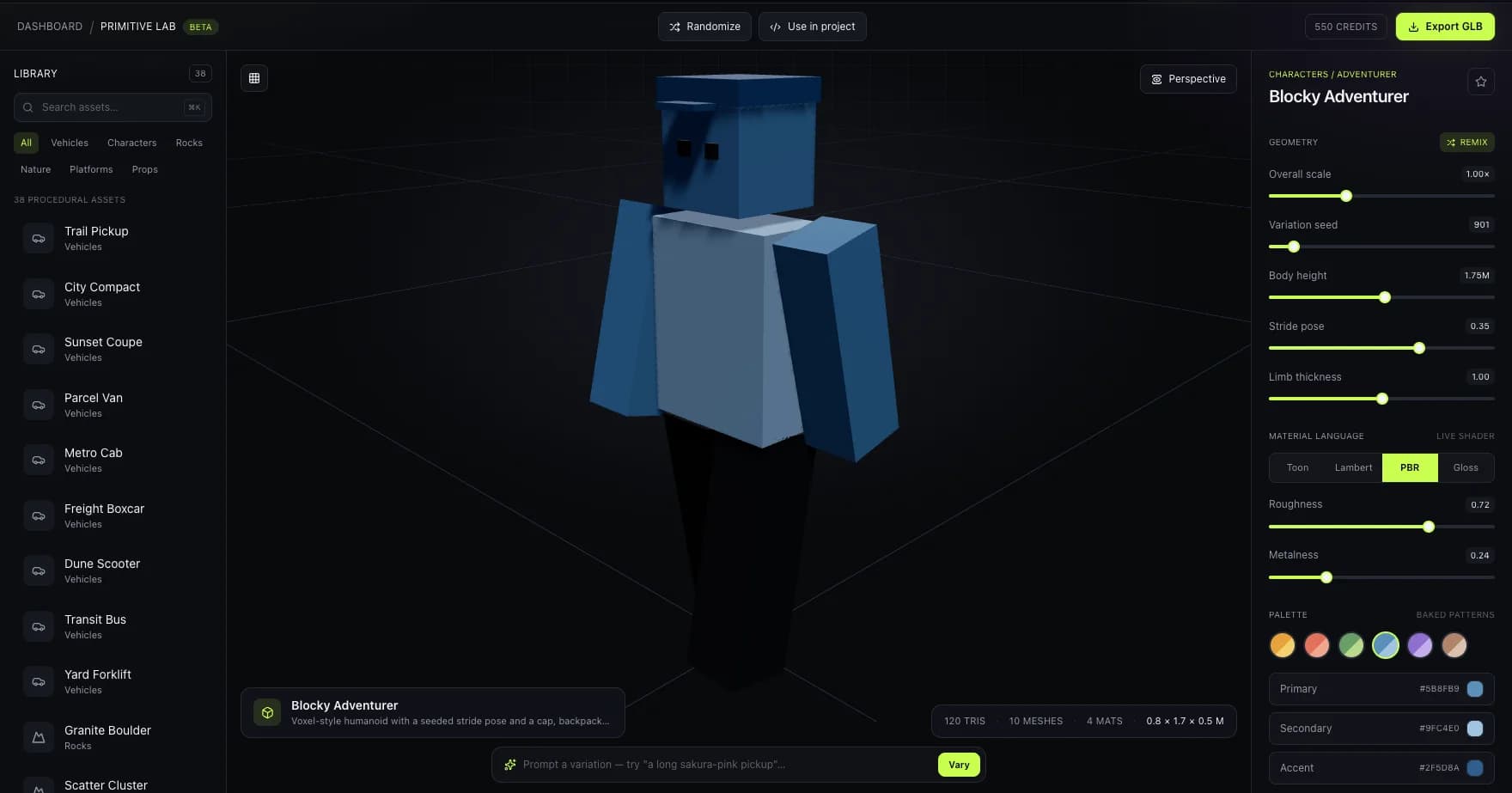
A real Primitive Lab capture — bunpav's in-browser review step for a rig-ready character, shown here for context next to Meshy's generate-texture-rig-animate pipeline.
where bunpav wins
No subscription to babysit
Credit packs don't expire on a monthly clock the way a Meshy Pro subscription does — useful between projects or during a game jam lull.
Print and AR formats out of the box
STL and USDZ ship alongside GLB, FBX, and OBJ, covering 3D printing and Apple AR Quick Look without a separate conversion step.
where Meshy AI wins
You can use it right now
Meshy has been publicly self-serve for years. bunpav is still gated behind a private-beta waitlist, which is the single biggest practical gap between the two today.
A deeper animation library
500+ preset animation clips and native engine plugins mean less manual setup once a rigged character lands in Unity, Unreal, Godot, or Roblox.
who should pick which
Match the tool to the job
Pick Meshy if
You need a full generate-texture-rig-animate loop today, want native Unity/Unreal/ Godot/Roblox plugins, and can either accept public free-tier output or pay for private ownership.
Join the bunpav waitlist if
You'd rather buy credits when you need them than run a subscription, want STL and USDZ export alongside game-engine formats, and don't mind waiting on beta access to open up.
faq
Questions, answered
What is the main difference between Meshy and bunpav?
Meshy is a broader, publicly-available pipeline covering generation, AI texturing, auto-rig, and animation presets with native game-engine plugins. bunpav focuses on prompt-or-photo-to-mesh with auto-rig and a wider raw export range (including STL and USDZ), but is still in private beta.
Is Meshy's free tier good enough for a real game?
Only for prototyping — free-tier output on Meshy is public and CC BY 4.0 licensed, which most commercial games can't use for final assets without paying for a private, owned generation.
Does bunpav have anything like Meshy's animation presets?
No. bunpav auto-rigs a humanoid or creature skeleton in the same pass as generation, but it doesn't ship a preset animation clip library the way Meshy does — you'd still animate the rigged skeleton yourself.
Which tool is cheaper for a solo indie dev?
It depends on cadence. If you generate steadily every month, Meshy's $20/month Pro plan for 1,000 credits is straightforward. If your usage is bursty — a game jam weekend, then nothing for two months — bunpav's prepaid packs avoid paying for idle months.
Can I sign up for bunpav today the way I can with Meshy?
Not yet. bunpav is in private beta behind a waitlist at bunpav.com. Meshy has been publicly self-serve for years — that's a real, current gap worth knowing before you plan a project timeline around bunpav.
go deeper